A Step-by-Step Guide to KV Cache Compression Using TurboQuant
Introduction
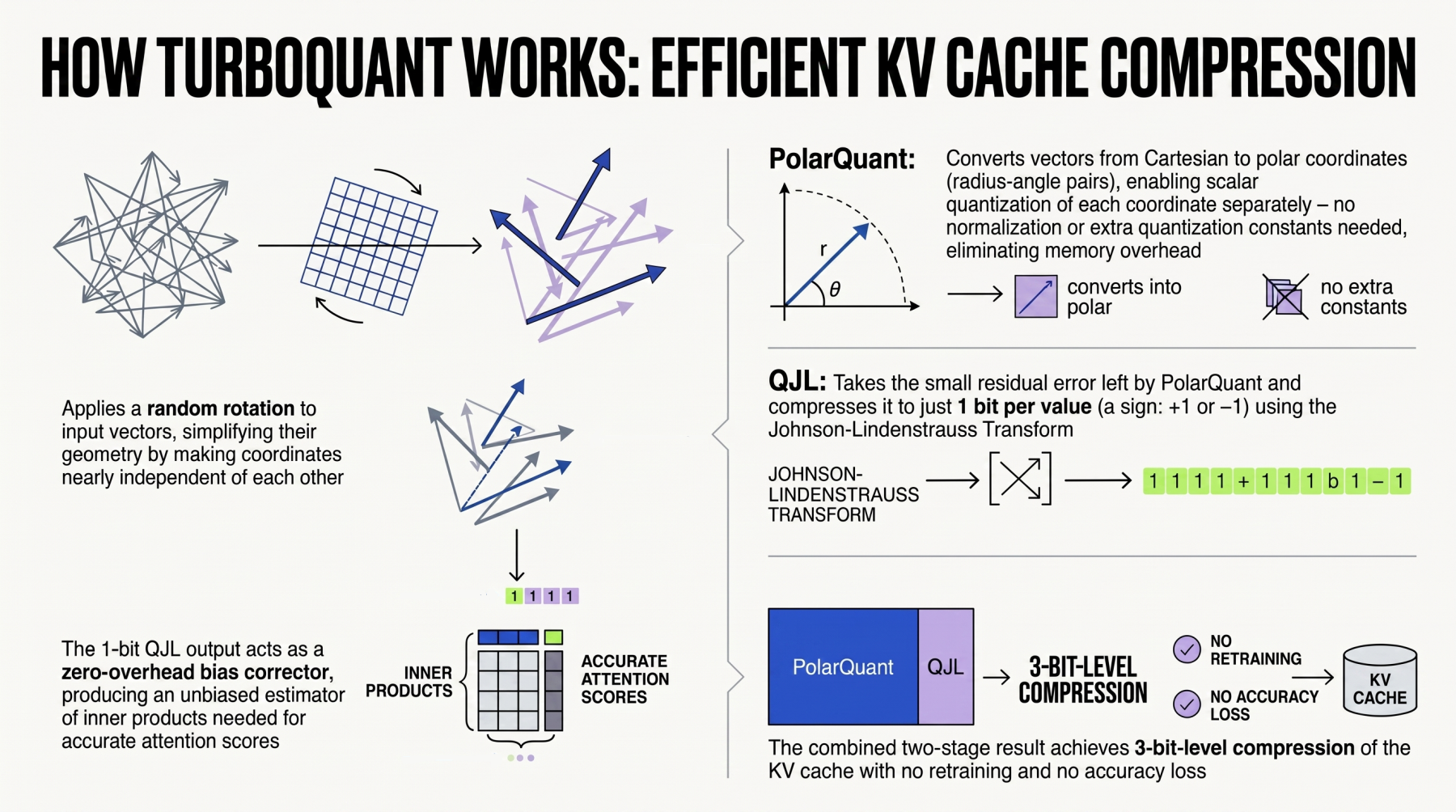
TurboQuant, recently launched by Google, is a cutting-edge algorithmic suite and library designed to apply advanced quantization and compression techniques to large language models (LLMs) and vector search engines — a critical component of Retrieval-Augmented Generation (RAG) systems. This guide walks you through using TurboQuant specifically for KV cache compression, which reduces memory footprint and speeds up inference in LLMs. By following these steps, you'll learn how to download, configure, and apply TurboQuant to compress key-value (KV) caches without sacrificing model accuracy.
What You Need
Before starting, ensure you have the following:
- A Unix-like environment (Linux or macOS) with Python 3.8 or later installed.
- PyTorch 2.0+ (optimized for your hardware, e.g., CUDA for NVIDIA GPUs).
- Basic familiarity with command-line tools and Python virtual environments.
- Access to a pre-trained LLM (e.g., Gemma, Llama 2) — either downloaded locally or from Hugging Face Hub.
- TurboQuant library (install via pip or from source).
- Optional: A vector search engine like ScaNN or FAISS if using TurboQuant for RAG systems.
Step-by-Step Instructions
Step 1: Install TurboQuant and Dependencies
Set up a clean Python virtual environment and install TurboQuant along with its core dependencies. Open a terminal and run:
python -m venv turboquant-env
source turboquant-env/bin/activate
pip install turboquant torch transformers
If you prefer the latest development version, clone the repository and install manually:
git clone https://github.com/google/turboquant.git
cd turboquant
pip install -e .
Verify the installation by importing TurboQuant in Python:
python -c "import turboquant; print('TurboQuant ready')"Step 2: Prepare Your Model
Load your chosen LLM using Hugging Face’s transformers library. For demonstration, we’ll use google/gemma-2b (ensure you have accepted the license on Hugging Face).
from transformers import AutoModelForCausalLM, AutoTokenizer

model_name = "google/gemma-2b"
tokenizer = AutoTokenizer.from_pretrained(model_name)
model = AutoModelForCausalLM.from_pretrained(model_name, torch_dtype=torch.float16, device_map="auto")
Move the model to evaluation mode to disable dropout:
model.eval()Step 3: Configure TurboQuant for KV Compression
TurboQuant offers several quantization modes (e.g., INT4, INT8, NF4). For KV cache compression, use the dedicated KVCompressor class. Import and initialize:
from turboquant import KVCompressor

compressor = KVCompressor(
    quantization_bits=8,           # Use 8-bit precision (options: 4, 8)
    group_size=64,                 # Group size for quantization (common: 32, 64, 128)
    compression_strategy="dynamic" # Dynamic adjusts per layer; alternative: "static"
)
Adjust parameters based on your memory vs. fidelity trade-off. Lower bits reduce memory more but may degrade quality.
Step 4: Compress the KV Cache During Inference
Integrate the compressor into the forward pass. TurboQuant automatically intercepts and compresses KV pairs as they are generated. To enable, wrap the model:
from turboquant import compress_kv_cache

# Apply compression to the model
compress_kv_cache(model, compressor)
Now run inference with a sample prompt to verify the compression works:
prompt = "Explain quantum computing in simple terms."
inputs = tokenizer(prompt, return_tensors="pt").to("cuda")

with torch.no_grad():
    outputs = model.generate(**inputs, max_new_tokens=50)

print(tokenizer.decode(outputs[0]))
Check the memory usage of the KV cache before and after compression using PyTorch’s memory profiler or nvidia-smi.
Step 5: Evaluate and Fine-Tune Compression Parameters
After initial compression, measure the model’s perplexity on a validation dataset or a set of sample queries. If perplexity increases significantly, adjust the group_size or try a mixed-precision approach where certain layers use higher bits. TurboQuant provides a calibration utility:
from turboquant.calibration import calibrate_kv

calibrate_kv(model, compressor, calibration_data=validation_dataset, steps=100)
This automatically selects optimal per-layer quantization parameters.
Step 6: Deploy in a RAG Pipeline (Optional)
If you use TurboQuant for vector search compression in RAG, integrate it with a vector database. For example, with FAISS:
import faiss
from turboquant import quantize_embeddings

# Assume embeddings from your retriever (e.g., sentence-transformers)
embeddings = model_embedding_function(your_chunks)
compressed_embeddings = quantize_embeddings(embeddings, compressor)

index = faiss.IndexFlatIP(len(compressed_embeddings[0]))
index.add(compressed_embeddings)
Now queries are also compressed during retrieval, reducing latency and storage.
Tips for Best Results
- Start with 8-bit: For most LLMs, 8-bit KV compression offers 4x memory reduction with negligible quality loss. Use 4-bit only if you have extreme memory constraints.
- Monitor throughput: Compression adds a small overhead. Profile inference speed with and without TurboQuant to ensure you gain overall throughput.
- Use dynamic grouping: The dynamic strategy usually preserves more information than static grouping. Calibrate on your specific dataset.
- Combine with other optimizations: TurboQuant works well alongside FlashAttention and PagedAttention for even better performance.
- Test on your hardware: Results vary between GPUs. Always run a small benchmark before full deployment.
With these steps, you can effectively compress KV caches in LLMs using TurboQuant, reducing memory usage and enabling larger batch sizes or longer sequence lengths. For more details, refer to the official TurboQuant repository.